Wake-up call services: how they work, and how to choose one
A wake-up call service phones you at a time you choose and keeps working until you're properly awake — no snooze button to swat, no willpower required. It's the same idea as the call a hotel front desk gives you, except a modern service does it every morning, wherever you're sleeping. This guide covers what these services actually are, how they work, the real options you can use in 2026, and how to pick one that fits the way you sleep.
What a wake-up call service is
The idea comes from hotels. A wake-up call — an alarm call in the UK, a morning call in parts of East Asia — is a service where you ask to be phoned at a set time so you wake up then, rather than trusting a clock beside the bed. A standalone wake-up call service takes that hotel feature and makes it available to anyone, any day: you register your number, tell it when to call, and it dials you at that time.
The reason people reach for a call instead of an alarm is simple. An alarm is something you have to obey — and at 6 a.m. the version of you making decisions is not the version who set it. A ringing phone is different. It's an interruption from outside your own head, and most people are wired to answer a ringing phone even when they'd happily silence a beep. That external nudge is the whole point.
How a wake-up call service works
Under the hood, almost every service follows the same three steps.
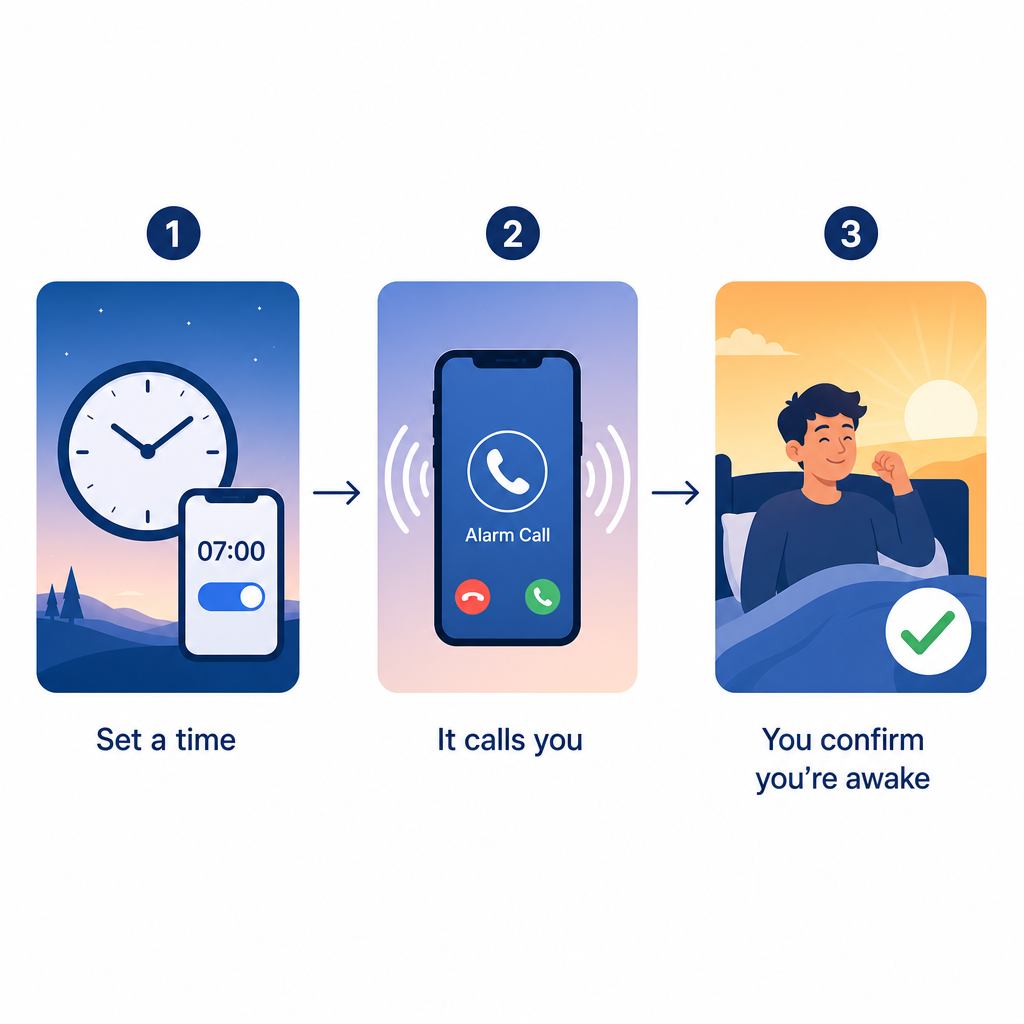
- You set a time. You enter your phone number and the time you want to be called, once or on a repeating schedule (weekdays, every day, or specific days).
- It places a real phone call. At that time the service dials your number over the ordinary phone network. Your phone rings like any other call, so it cuts through Do Not Disturb rules that let calls ring, and it works on a landline or a mobile.
- You answer — and, on better services, prove you're awake. A basic service just plays a message. A stronger one asks you to do something — press a key, answer a question, or solve a quick problem — so it knows you're genuinely up and not answering in your sleep.
That third step is the difference between a call that wakes you and a call you sleep through. The services worth paying for all have some version of it.
The main types of wake-up call service
- Hotel front-desk calls. The original. You ask reception for a call and the hotel's phone system rings your room at that time. Great while you're travelling, useless the other 360 nights of the year. We cover these in detail in our guide to hotel wake-up calls.
- Basic robocall services. Websites that ring your own phone at a set time and play a message. Cheap or free, reliable enough for a light sleeper, but usually nothing beyond the ring.
- Call-plus-challenge services. The same ring, but you have to answer a question or solve a sum before they stop calling — built for people who silence anything and roll over.
- Alarm apps that dismiss with a task. On-device apps that make you scan a barcode, do maths, or take a photo to turn the alarm off. Effective, but they're an app on your phone, not a real inbound call — we compare these and the true call apps in our guide to wake-up call apps.
- AI briefing calls. A newer category: instead of a bare ring, the call speaks a short briefing — the time, the weather, what's on your calendar — and asks you to confirm you're awake. It gives you a reason to stay up, not just a noise to escape.
- Personal or human calls. A real person (or a booked one-off service) who rings you by name. Warm and effective, but hard to sustain daily and usually priced per call.
The best wake-up call services in 2026, compared
Here's an honest look at the services people actually use, what each one does, and who it suits. Most of the long-running names are basic robocalls built in the smartphone era; a couple of newer options do more. Prices change — check each site before you sign up.
| Service | What it does | Price | Best for |
|---|---|---|---|
| WakeUpCallMe | Schedules a single free wake-up call, available worldwide (ad-supported) | Free | A no-cost one-off call |
| Snoozester | Automated wake-up calls and phone reminders on a schedule you set | Free trial, then paid (~$5/mo) | Basic recurring robocalls on a budget |
| Better Wake-Up Call | Calls again every 9 minutes until you solve a maths question; works on mobiles and landlines in the US, Canada and Puerto Rico | 5-day free trial, then $5.99/mo | Heavy sleepers who hit snooze and go back to sleep |
| OnTimeCall | Real phone-call reminders to UK, US and Canada numbers; record your own voice free, AI voice on paid plans | Free plan; paid tiers add AI voice | DIY recurring call reminders |
| Wake Me Up | A booked, personalised wake-up call at your chosen time | ~$5 per call | An occasional, special-occasion call |
| Alarmy | A phone alarm app — not a call — that you dismiss with missions like maths or scanning a barcode | Free with paid tier | People who want an on-device alarm with hurdles |
| Reveille | An AI call that speaks a short briefing (time, weather, your calendar), then asks you to press 1 to confirm you're awake; syncs with Google Calendar | Free plan; from $9.99/mo | A smart daily call that knows your schedule |
Want the long version, with the history and the ones that have come and gone? We keep a running review of every wake-up call service, reviewed. If you're weighing up a specific one, we also have head-to-head pages on the WakeUpCallMe alternative and the Better Wake-Up Call alternative. And if you specifically want a phone app rather than a website, we compare the best wake-up call apps too.
How to choose the right one
There's no single best service — the right one depends on why an alarm isn't working for you.
- You sleep through alarms. You need a service that keeps calling and makes you do something to stop it, not one that rings once and gives up. Look for repeat calls and a wake-check step. (If this is you, it's worth understanding why you sleep through your alarm in the first place.)
- You have ADHD or struggle to get going. The hard part usually isn't hearing the alarm — it's starting. A call that talks to you and hands you the first step of the day beats a noise you dismiss on autopilot. More on waking up with ADHD.
- You travel or work shifts. You want something that works across time zones and repeats reliably, so you're not rebuilding an alarm in a new hotel every night.
- You just want a friendly, no-fuss nudge. A free or cheap robocall is plenty. Don't overpay for features you won't use.
How to set up a wake-up call
- Pick the service that matches the list above. Decide whether you need a bare ring, a challenge, or a spoken briefing.
- Register your phone number and, if the service allows, save its number in your contacts so your phone doesn't filter it as an unknown caller.
- Set the time and the days. Choose a one-off call or a repeating schedule.
- Turn off "silence unknown callers" if your phone has it, or add the service to your allowed callers, so the call rings through.
- Test it once before you rely on it for something important, and keep your volume up and the phone off silent overnight.
Why a phone call beats an alarm
An alarm depends on you overriding your own instinct to make the noise stop. A phone call flips that: it's an external event you answer, not an internal decision you have to win. That's why hotels still ring rooms, why the wake-up call outlived the pager, and why a spoken call — something that tells you the time, the weather and the first thing on your calendar — gets more people out of bed than one more beep. The goal isn't to startle you awake; it's to give you a reason to stay up.
Where Reveille fits
Reveille is the AI-briefing version of this. It calls your phone every morning, speaks a short briefing — the time, the weather, what's on your calendar — and asks you to press 1 to confirm you're actually up. Because it syncs with your Google Calendar, the call knows what your day looks like, not just what time it is. There's a free wake-up call to try it, and paid plans start at $9.99/month for a daily call. If you want the full rundown of how it works, see Reveille's wake-up call.
Common questions
What is a wake-up call service?
It's a service that phones you at a time you set so you wake up then, instead of relying on an alarm clock. It started as a hotel feature and now exists as standalone apps and websites you can use from home every day.
Are hotel wake-up calls still a thing?
Yes — most hotels still offer them, usually through an automated phone system rather than a person on the line. You can read exactly how hotel wake-up calls work and how to request one.
Do wake-up call services work if you sleep through alarms?
They work better than alarms for many people, because a ringing phone is harder to ignore than a beep and the good services keep calling until you confirm you're awake. Choose one with repeat calls and a wake-check step rather than a single ring.
How much does a wake-up call service cost?
Anywhere from free to around $10 a month. Free and ad-supported options handle a basic call; paid services (roughly $5–$10/month) add repeat calls, challenges, reminders or a spoken briefing.
Is there a free wake-up call service?
Yes. Some services offer a free scheduled call, and Reveille has a free wake-up call you can start without a credit card.
Which wake-up call service is best for heavy sleepers or ADHD?
Pick one that does more than ring — either a call that repeats until you solve a challenge, or an AI briefing call that speaks to you and hands you the first task of the day. A single, silent-able ring is the easiest to sleep through.